Rebuilding My Blog - Don’t Wait Until It’s Finished to Make It Happen
My blog has been under construction for a few years now, but instead of waiting for perfection, I’ve decided to rebuild it from scratch. Alongside this, I’m launching a new Markdown notes website—an “anti-chamber” where I can quickly share drafts and thoughts as they come.
An Email-Based Blog: Why Outlook is the Best Tool
One of the coolest aspects of this new approach is using my email client—Outlook—as a blogging tool. Here’s why:
- Drafts Galore: I can have as many drafts as I want, all neatly organized.
- Sync Across Devices: My content automatically syncs across all devices, so I can start writing from my phone, whether I’m waiting somewhere or on the go.
- Rich Editing Features: Outlook offers everything needed for writing, from spelling and grammar checks to Copilot for writing assistance.
- Quick Image Addition: I can easily add images, even drawing directly on the Outlook mobile app, which saves as images.
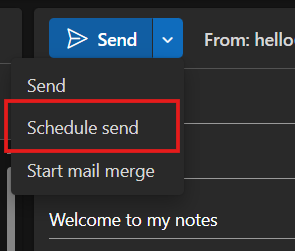
- Easy Scheduling: With Outlook’s ability to schedule emails, I can plan my posts to go live at any chosen time. This means I can prepare a post and have it published with just a minute’s notice.
How to Send an Email and Have It Posted Online
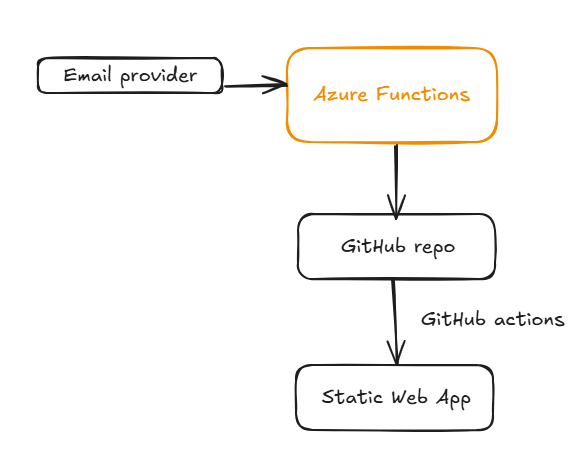
Inspired by the HEY World service, my new blog architecture is both innovative and straightforward. By leveraging a combination of email servers, Azure Functions, and GitHub Actions, I’ve created a seamless process to turn an email into a blog post.
For now, the code is private, but I’m happy to opensource it if anybody finds it useful.