Developers, watch your weight!
In mobile development, there is a metric developers rarely watch: the size of the application package — appx, xap, apk, and so on. Yet it is common to find applications around or above 10 MB without justification. While writing this post, I saw these among the Windows Phone Store’s recommended apps:
- Batterie, an application for displaying the battery level: 7 MB.
- App in the Air, an application providing flight information: 13 MB.
- Viber, the chat application, weighing in at 21 MB!
None has an obvious reason to be so large. That size can cause several problems: users’ bandwidth, which may be metered; frequent updates that compound the problem; and limited disk space, especially on entry-level devices.
I therefore carried out a small experiment on Deezer for Windows Phone. Here are the results. Cyril Mottier of CapitaineTrain wrote an article on the same subject for Android, which I recommend. More recently, James Montemagno of Xamarin also wrote about it.
I started this article more than four months ago, which explains why the data may look a little old. The content and conclusions remain relevant.
Taking stock
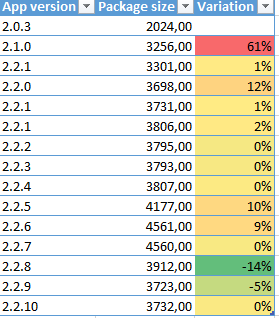
I began by listing the size of the last 15 public releases and the percentage change from each version to the next. Until version 2.2.8, the size kept increasing. Although the changes remained reasonable — the 61% increase between versions 2.0.3 and 2.1 corresponded to a redesign and many new features — and the total size was acceptable, below 5 MB, we wanted to curb the trend.
I worked on two areas to reduce the app’s size:
- The files included in the package.
- The “weight” of the code: the main executable and all assemblies.
Application packages are simply ZIP files. Keep that in mind below, where we mainly discuss the uncompressed size of files.
Reducing content with WinDirStat
WinDirStat has long been on my list of indispensable tools, but I had never thought to use it on a package before this experiment. At startup, you can select a folder rather than a disk and analyze the distribution of file sizes by type or directory.
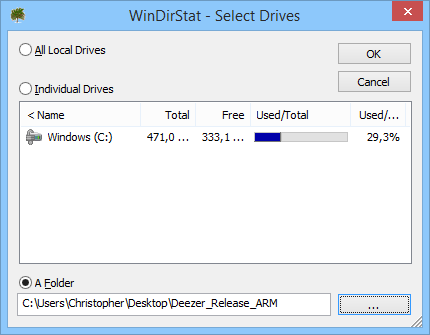
For Windows Phone, Windows Store, and universal applications, analyze the package itself — .xap or .appx — rather than the output folder, Debug or Release. For some Store and universal applications, you also need to consider language- and resolution-specific packages within bundles.
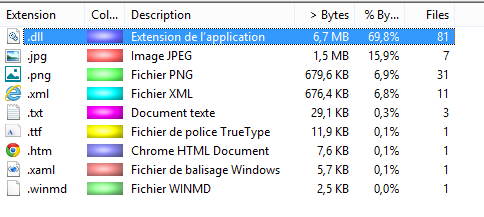
The first analysis produced fairly predictable results. Code inside assemblies accounts for most of the application’s weight. Several points stand out:
- Images: The package contains relatively few images. Most have already been processed with PngGauntlet or an equivalent. However, some are unnecessary: AlignmentGrid.png, certain default app-bar images, and so on.
- XML files: Of the seven files, only
WMAppManifest.xmlis useful. It weighs just 4.5 KB, so we can save 6.7% of the app’s size. What are the others? Assembly documentation files: Newtonsoft.Json.xml, System.Net.Http.xml, and so on. - The TXT file: This is a license file included through a NuGet package. In our case it is not very costly, although still unnecessary. The lesson is to watch files automatically included by NuGet packages.
- The TTF file: This file alone saves considerable space. All icons in the application are stored in a custom font rather than individual .png or .svg files. Just 12 KB contains more than 60 icons!
- The HTML file: We need it. Yes, that is sad…
- The .xaml and .winmd files: Nothing special here. The .xaml is AppManifest, and the .winmd is ClrCompression.
We already took a considered approach to the files included in our packages. Even so, this step alone recovered 1 MB before compression.
Reducing code with NDepend
I was given NDepend free of charge, particularly in connection with this article. However, this article covers less than one hundredth of the value of having NDepend in your toolkit. I strongly recommend visiting NDepend’s website to see how it can help improve code quality. I plan to include it in our toolchain in 2015 and hope to write more about it ;).
.NET assemblies account for 70% of the total application size. No surprise, but a closer look reveals three categories:
- Several assemblies for the application itself.
- A substantial set containing translations: the app is translated into 31 languages.
- External assemblies, meaning code we did not produce.
There is little to do about the translations. Our files contain only useful translations — a subject that could fill several articles. If you are interested, see the slides from my AppDays 2014 presentation. This particular issue is also addressed in universal applications through Appx Bundles.
The same is true of our own assemblies: they account for 44% of the package, with little room for improvement here. That means 26% of the total package size comes from referenced assemblies, which gives us a promising direction.
The app has relatively few external dependencies. Adding a library to the project, and getting it accepted in code review, requires solid arguments: usefulness, code quality, and time saved compared with an in-house implementation. Only a few libraries passed those criteria:
- HttpClient.
- ClrCompression.
- Newtonsoft.Json.
- Facebook C# SDK, the Outercurve Foundation version.
- Controls Toolkit and Coding4Fun.Toolkit.Controls.
- An assembly from our error-analysis solution.
- An assembly from our push-notification solution.
After months of development and various changes, are these libraries still useful? Is their contribution to the package size still justified? That is what we will examine with NDepend.
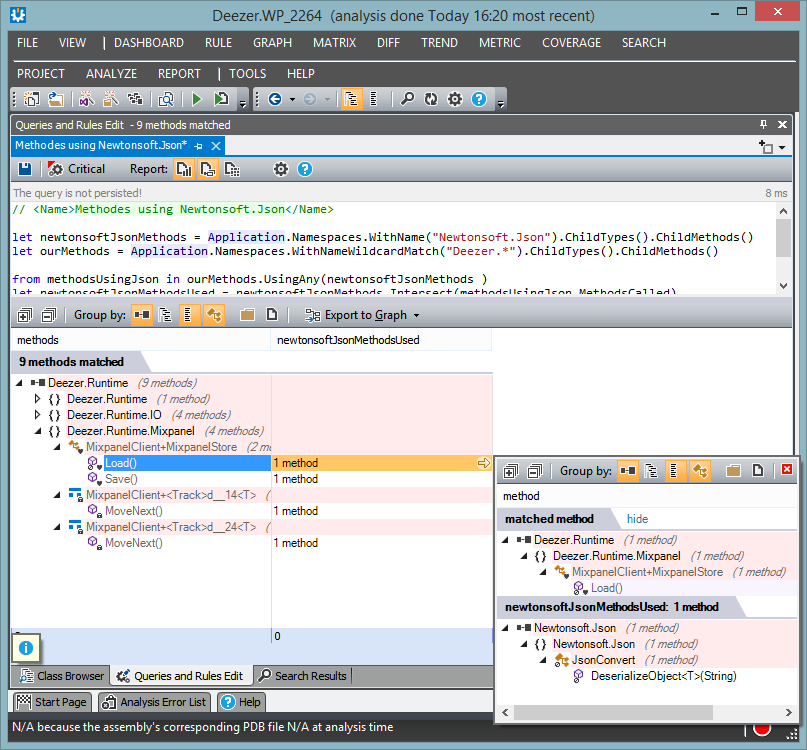
One of our best-known dependencies is Newtonsoft Json.NET. We can ask a simple question: which methods in our code call methods in that library?
With NDepend’s CQLinq feature, a few lines provide the answer. CQLinq lets you write LINQ queries over your code. To find all application methods calling something in the Newtonsoft.Json namespace, run:
// <Name>Methodes using Newtonsoft.Json</Name>

let newtonsoftJsonMethods = Application.Namespaces.WithName("Newtonsoft.Json").ChildTypes().ChildMethods()
let ourMethods = Application.Namespaces.WithNameWildcardMatch("Deezer.*").ChildTypes().ChildMethods()

from methodsUsingJson in ourMethods.UsingAny(newtonsoftJsonMethods )
let newtonsoftJsonMethodsUsed = newtonsoftJsonMethods.Intersect(methodsUsingJson.MethodsCalled)
select new {methodsUsingJson, newtonsoftJsonMethodsUsed }
Very few methods use this library: only nine. That is understandable here. We use only a few entry points, encoding and decoding JSON documents without special manipulation. Given the complexity involved, however, the library’s 400 KB is justified for now. We can still observe that our code is not tightly dependent on it.
Now consider Phone Control Toolkit and Coding4Fun Toolkit. How many controls from those two libraries do we actually use?
// List types of Coding4Fun Toolkit used by Deezer App
let c4fTypes = Application.Namespaces.WithNameIn("Coding4Fun.Toolkit.Controls",
   "Microsoft.Phone.Controls",
   "Clarity.Phone.Extensions").ChildTypes()

from c4fType in c4fTypes
where c4fType.IsUsedByNamespace("Deezer.*")
select new { c4fType }
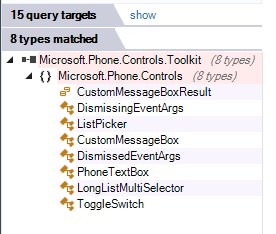
The result is not impressive: five controls used from two libraries totaling 900 KB! In a 6 MB application, that is significant. We rewrote those controls and saved one sixth of the application’s size.
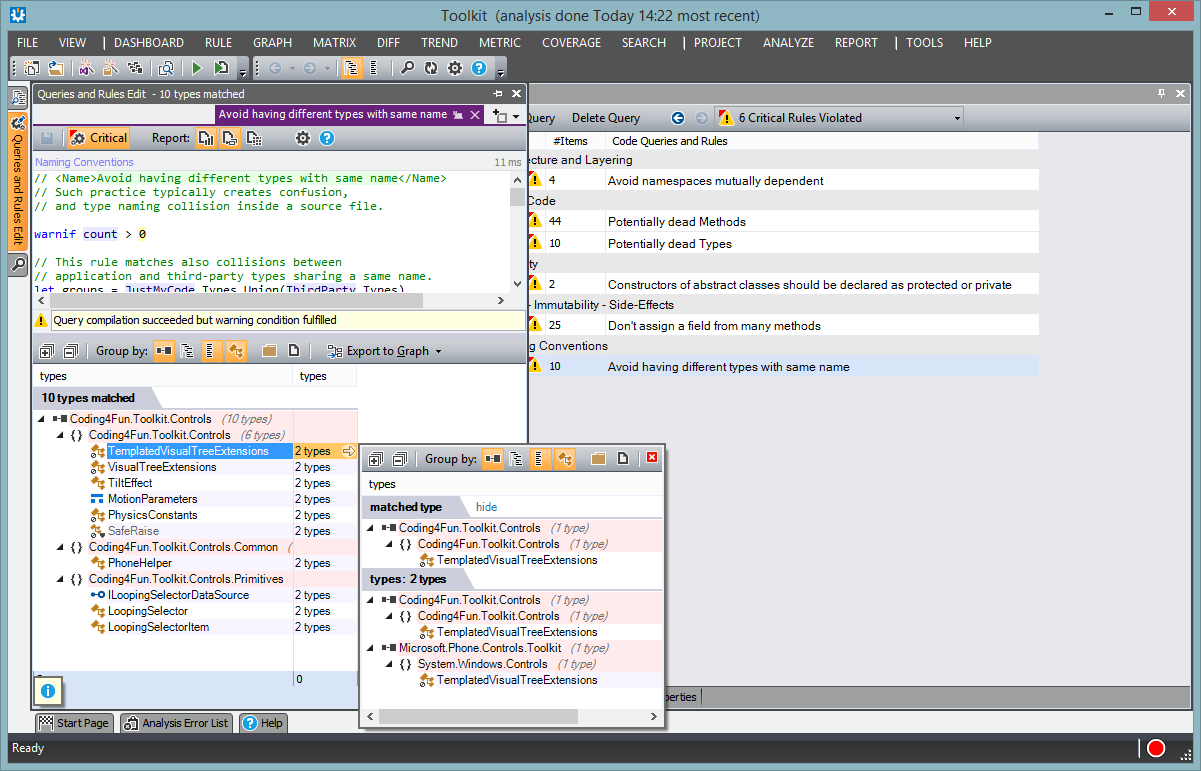
NDepend can also help assess a library’s quality before adding it to a project. For example, using both the Control Toolkit and Coding4Fun Toolkit introduces several types declared more than once. That can create quality problems and slow application maintenance. It took only a minute in NDepend to identify this issue.
Takeaways
Application size matters for mobile apps. Here is a very short list of things to watch:
- Reduce bundled image sizes using tools such as PngGauntlet.
- Remove documentation .xml files and PDB files.
- Watch additional files automatically included by NuGet packages.
- Regularly analyze which libraries are used and whether they remain relevant. You may start with an available library and later rewrite just the parts you need.